

How to become a Cookbook editor?
Anyone with a GitHub account can participate.
The cookbook is built from Markdown files (.md) and served directly from GitHub.
Editing on GitHub (for easy/quick changes)
Open the editor with the "Edit this page on GitHub" link at the bottom.
When ready to propose your changes just select "Create a new branch" and give it a name: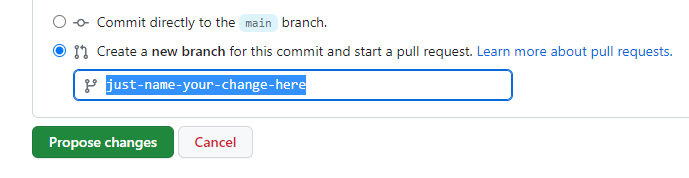
Your proposed changes will be merged after review.
Editing the Cookbook on your machine
If you prefer to preview exactly what your change looks like, then you need to run vuepress on your machine and modify the Markdown files with an editor (e.g. VSCode).
Prerequisites:
- Node.js (>= 18) ( https://nodejs.dev/en/learn/how-to-install-nodejs/ )
- pnpm ( https://pnpm.io/installation )
Clone the repository and do the one-time vuepress installation:
$ git clone https://github.com/chainmovers/sui-cookbook.git
$ cd sui-cookbook
$ pnpm install
To start vuepress (the server) do:
$ cd sui-cookbook
$ pnpm start
...
Open your browser at http://localhost:8080/sui-cookbook/
The browser updates as you change files under src/
See https://theme-hope.vuejs.press/guide/ for advanced Markdown features.
Submit your changes as a pull request; just ask for help as needed (it is not as hard as it seems once you have done it once).